









JavaScript, third-party scripts, widgets… Optimising
third-party elements is a particularly thorny issue for many teams, whether they’re in IT, Marketing or E-commerce. Yet 94 per cent of websites contain third-party scripts, and these deliver value both for the business and in terms of user experience: adverts, tracking, dynamic or personalised content, chat,
advanced features, A/B testing scripts… Yet they can double or triple the time it takes to access a feature, thereby impairing performance. The impact on loading speed can be explained in particular by the time taken for the browser to fetch and execute these scripts. So, how can you make the most of JavaScript whilst keeping your site fast? Is it possible to optimise your code to keep pages loading quickly – and thus maintain a good user experience – and if so
, how? This is what we set out to investigate in our study.

Definition of a third-party script and methodology of our analysis
What is a third-party
script? These are all elements hosted on a shared, public origin, widely used by a wide variety of websites, and which are not controlled by the website’s content publishers. They may be used for advertising (display and measurement), analytics, hosting public shared services or private content (CDN or Content Delivery Network), content (images, text, video, etc.), support or customer relationship
features
(chat, customer reviews, etc.), and the hosting of personal data… They may also include
marketing
features (A/B testing, sales features, lead generation, email marketing, etc.), social media (share buttons, ‘likes’, etc.) or tag management (to manage other third-party scripts). It’s certainly no secret to you by now: JavaScript affects page loading speed. To understand exactly how and why, we analysed the performance of the mobile versions
of over 200
French
e-commerce sites
during 2019. The data was collected over a nine-month period using WebPageTest, and we identified third-party
elements based on the list of trackers flagged as such by the
Ghostery
plugin. We then calculated the median of the results obtained across several tests to account for outliers, on mobile pages, using a 3G connection in Paris on a Nexus 5X (a mid-range phone), in Chrome, with one test per day comprising three runs per test.
What our analysis of third-party scripts reveals
Do adverts slow down web pages? Are all third-party scripts the same, and how can we measure their impact? Using the data we collected, we were able to identify different categories of third-party scripts and assess their impact on page load speed in a browser:
- those that significantly alter the page, such as A/B tests or certain chat solutions,
- tracking solutions,
- advertising.
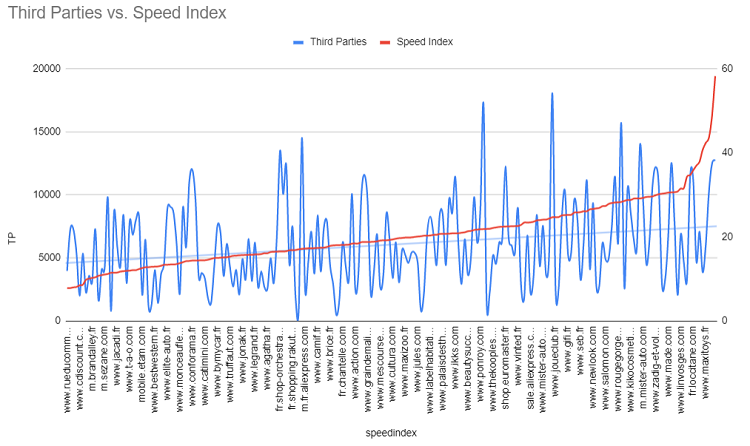
Let us reveal some of our findings: our analyses did not allow us to establish a direct correlation between the number of third-party scripts present in a site’s code and most web performance metrics related to display speed, such as the Speed Index.
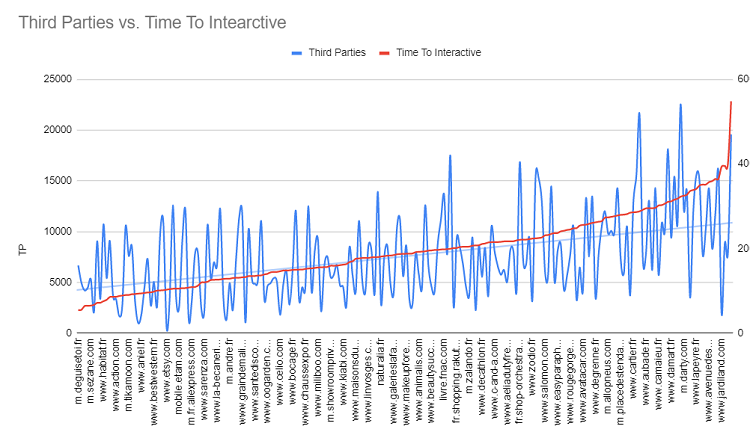
Nor is the link obvious in terms of interactivity, although we did notice a slight impact of third-party scripts on Time To Interactive and Load Time (which seems logical, since these metrics are influenced by the number of requests – and the more JavaScript there is in a page’s code, the more requests there are).
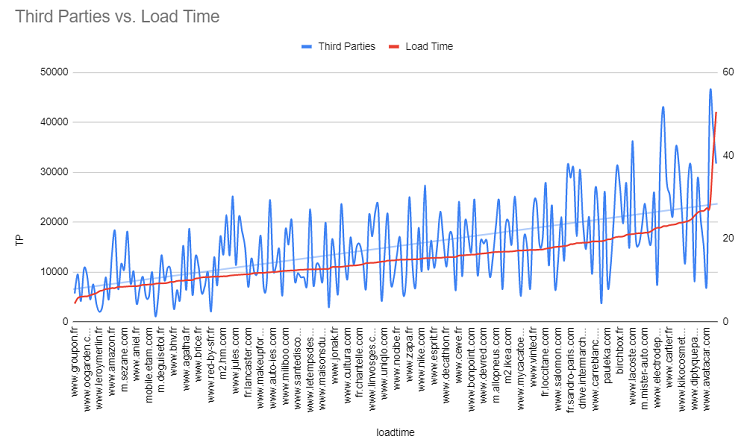
Consequently, it cannot be said that the number of third-party scripts or JavaScript is, in itself, a decisive factor for loading speed; our study illustrates this with concrete examples backed up by figures. We have therefore detailed several cases, explaining their performance:
- sites whose code contains numerous third-party scripts but whose web performance KPIs (Speed Index, Time To Interactive, First Input Delay, etc.) are good;
- and others which, by contrast, have poor loading times despite a relatively small number of third-party scripts in the page’s code.
In short, a website will not necessarily load slowly simply because it contains a large number of third-party scripts; you just need to optimise them!
A website slowed down by third-party scripts is not inevitable!
To generate advertising revenue, add or customise content, or offer features to visitors (chat, product suggestions, etc.),
third-party scripts are essential. Given this, how do you know which ones to prioritise, bearing in mind that some are essential for tracking, improving the user experience, customer relations, and so on? That’s what our study will help you understand. You’ll see that
third-party scripts don’t necessarily compromise your performance or user experience… provided you optimise your code and resources. Do you pay close attention to your HTML code, your CSS, or even the file sizes of your images and fonts? The use of JavaScript also deserves special attention and a certain level of expertise to ensure fast loading speeds for all your pages across all your users! To help you with this, you’ll also find our web performance experts’ advice on best practices, methodologies and tools for optimising your JavaScript resources – from WebPageTest to Lighthouse, including the features of Chrome Dev Tools (we regularly cover the technical details of these tools, and more generally the latest news on web performance, in our monthly newsletter. To subscribe: click here). In short, everything you need to optimise your code and files to ensure a fast website, boost your
PageSpeed Insights
score,
and make the most of advanced features for your marketing and user experience with complete peace of mind.
To explore the topic further via video, you can watch the recording of our two-part webinar,
tailored to your professional field:
- business roles (marketing, digital, e-commerce), to understand what third-party scripts are, how they’re managed by your Tag Management System, their impact on your performance and therefore your user experience (UX); and how to monitor, validate and prioritise them to optimise them:
- and technical/IT, to understand how to interpret the impact of JavaScript on a waterfall chart, how to detect ‘invisible’ third-party scripts, how to improve their implementation, and how to monitor and validate them to improve your page load speed in a browser:
To understand the weight and impact of third-party scripts on your page load speed and performance,
and to find out how to monitor and optimise them, discover the details of our study: