








Black Friday falls on 27 November. Within a fortnight, most e-commerce sites will freeze their releases. Winter is coming, and for tech teams it arrives early. Anything not checked by then goes live as it is.
The backdrop has shifted too. Many of your shoppers now read a Google AI Overview before they see your link, and more of them compare deals in ChatGPT or Gemini before they ever reach your site. Here are eight things to review with your teams this week, while there is still time to change them.
This Christmas, part of your sales will be decided inside AI assistants
This Black Friday, a growing share of UK shoppers will compare offers in an AI assistant before choosing where to buy. According to YouGov’s UK Mega Sales Report (October 2026), 34% of likely Black Friday and Cyber Monday shoppers plan to use AI, up from 19% last year. A Shopify survey goes further, looking at the whole holiday season rather than the Black Friday weekend alone.
- 64% of UK shoppers are likely to use AI for at least one shopping task this holiday season, first of all to find deals (29%).
- 41% would let AI build their basket, and 28% would trust it to complete the purchase.
Counted in clicks, this traffic still looks small. But it grows fast and it converts. In August 2026, AI referrals to UK retail sites rose 149% year on year, and AI-referred shoppers converted 20% better than other traffic, according to Adobe data reported by Retail Gazette. Two years earlier, they were 43% less likely to convert.
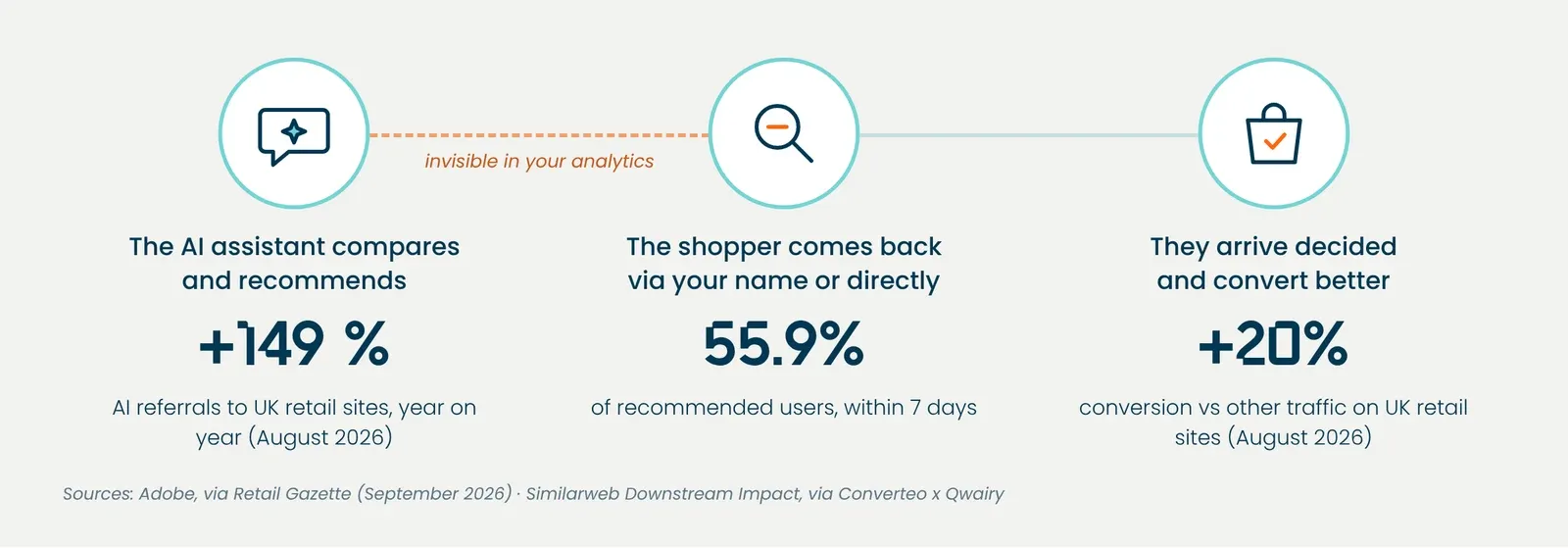
And clicks only tell part of the story. After a recommendation, many shoppers come back later by typing your name into Google or your address into their browser. Similarweb sees this in 55.9% of users within seven days. Those visits are then counted as direct or branded search, and your analytics never see the assistant’s role. These visitors have done half the journey already. They have compared, and they know what they want. The eight points below help you prepare for Black Friday with that new journey in mind.
1. Does your Black Friday page already have a history?
A page created in the week of the sale has no age, no links and little chance of being cited as a source. Google and AI assistants rely on pages they already know. And ranking first is worth less than it was. When an AI Overview appears, the top organic result loses 58% of its click-through rate on average, according to an Ahrefs study of 300,000 keywords published in February 2026.
To check:
- A URL without a year (/black-friday), reactivated every year rather than rebuilt.
- 301 redirects from old dated URLs, with no chains or loops.
- Links to the page from the homepage, main menu and relevant categories, in HTML and not only inside a JavaScript carousel.
- The page is indexable now, with holding content rather than a noindex until the day itself.
2. Do your key pages answer your shoppers’ questions?
Before paying, a Black Friday shopper wants to know when the offer ends, whether it will arrive before Christmas, whether the gift can be returned in January and whether they can spread the cost. They also want to know whether the product suits them. In an AI assistant or Google’s AI Mode, they describe their situation, for example “a waterproof speaker for my 14-year-old, under £80, delivered before 20 December”. If your page doesn’t say who the product is for, what it is for and how fast it ships, the assistant will look for the answer elsewhere, often at a competitor’s.
An FAQ on your Black Friday page, top categories and best-selling product pages meets that need. Write it page by page, because the same FAQ copied across fifty product pages answers none of their questions.
To check:
- Questions come from your real data, such as customer service, live chat, site search or reviews.
- Each answer gives precise, dated information, such as your last order date for Christmas delivery, your extended Christmas returns policy, payment options including buy now, pay later, and the start and end dates of the offer.
- Each answer gives the information in its first 50 to 80 words, in sentences that make sense on their own.
- The FAQ uses FAQPage markup, and comparisons or price grids are HTML tables rather than images.
- The text sits in the page’s HTML, not loaded on click or injected with JavaScript, because most AI assistant crawlers don’t run JavaScript.
- Your FAQ, terms and promo banners all say the same thing.
3. Is your price the same everywhere?
During Black Friday, a price can change several times a day. Google compares the price in your Merchant Center feed with the one on the page and in its structured data. If they differ, the product can be disapproved, and repeated mismatches can lead to account suspension (Google Merchant Center Help). Googlebot only reads the price in the HTML returned by your server, so a price loaded with JavaScript is enough to trigger the error. And a disapproved product drops out of Shopping results just when you need it most.
To check:
- Price and availability in your Product / Offer markup match what is displayed, including the was-price.
- Your feed updates as often as your prices change during the sale.
- Out-of-stock products leave the feed or switch to “out of stock” instead of showing as available.
4. Can crawlers read your pages?
For AI Overviews, Googlebot reads your pages. It runs JavaScript, but with a delay, which uses up your crawl budget. Most AI assistant crawlers don’t run it at all. Reviews or descriptions loaded in JavaScript simply don’t exist for them. Adobe gives the average UK retail product page a score of 66 out of 100 for how much of it AI models can read (Marketing Week, March 2026). For a retailer with thousands of SKUs, a sizeable share of the catalogue is invisible to AI.
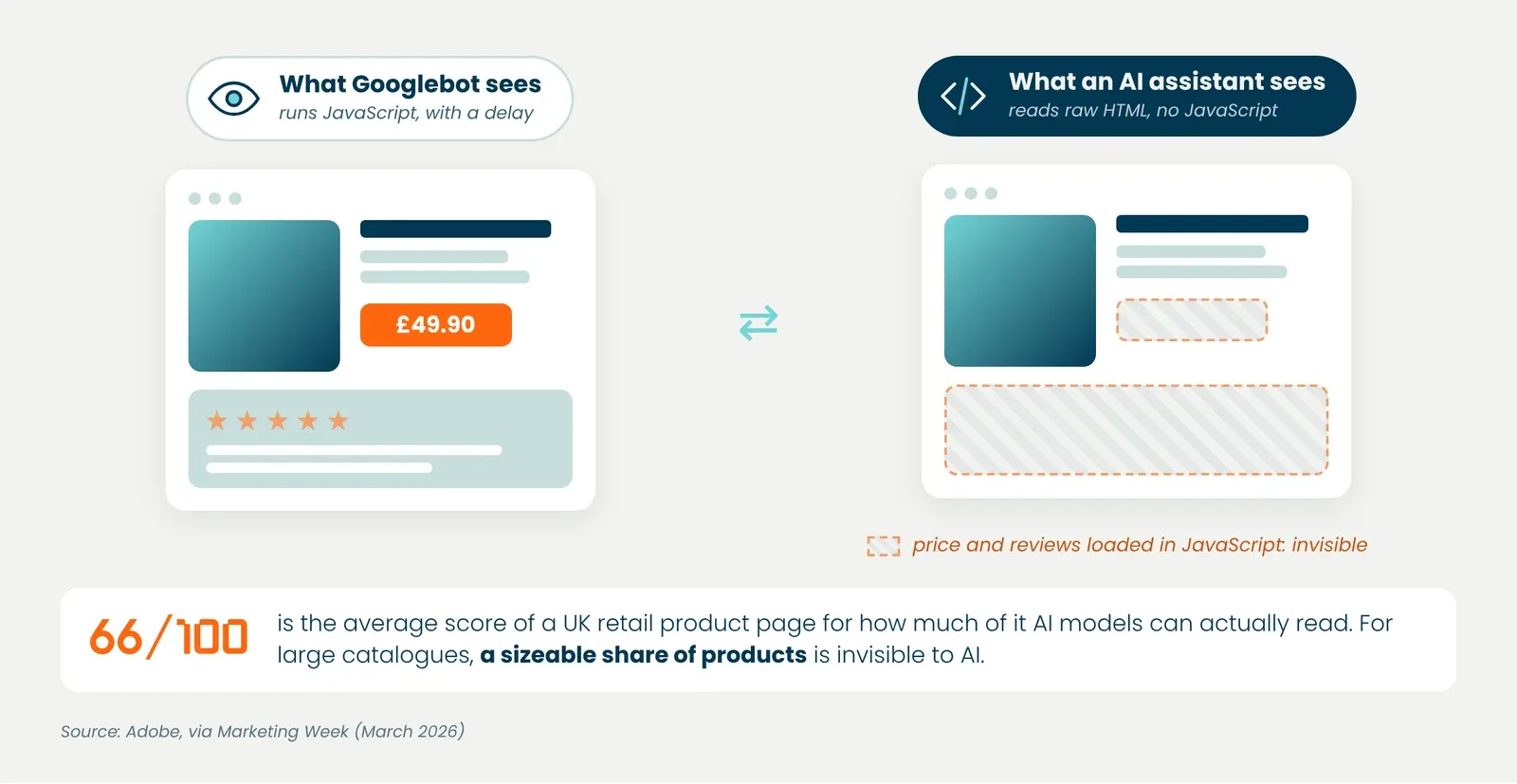
Not all crawlers do the same job. Blocking a training crawler is a brand decision. Blocking a search crawler, the one that feeds answers in real time, takes you out of those answers. Sometimes the block comes from a WAF (web application firewall) or a bot-protection tool left on its default settings, with no business decision behind it.
To check:
- Your server logs show which crawlers visit, on which pages, and with which response codes. Google Analytics 4 filters out bots, and Search Console only shows Googlebot.
- No security rule added for the peak blocks Googlebot or the search crawlers you want to keep.
- The main content, price and FAQ of your key pages can be read in the initial HTML.
5. Will your pages stay fast on peak day?
Black Friday creates urgent buying. The offer is time-limited and the shopper decides quickly. A slow page costs more on that day than on any other, because the impulse to buy does not survive the wait. On the day, your visitors have roughly the patience of a four-year-old at 6am on Christmas morning. Across our customers, we have seen for years that the effect of speed on conversion grows during traffic peaks. The Milliseconds Make Millions study by Deloitte and 55 for Google, which covered European and US brands, already measured 8.4% more retail conversions for every 0.1 second saved on mobile.
Visitors coming from an AI assistant are even less forgiving. They land cold on a product or category page, without passing through your homepage, and they have already compared. If the page lags, the next offer is one tap on the back button away.
To check:
- Third-party scripts added for the sale (countdown timers, pop-ups, media tags) are tested, and a script that fails does not block the page from rendering.
- Promo visuals are compressed and in the right format. The hero banner is often what drags down LCP, the time it takes to display the largest visible element.
- Black Friday pages, categories and best-selling products are cached, and a load test has been run at last year’s peak volume.
- A waiting room is ready in case the site saturates. It holds visitors for a few seconds instead of showing them an error, and can offer to email them as soon as they can complete their order. The Fasterize platform includes this overflow page.
- Your INP (how quickly the page responds to taps and clicks) holds up on mobile through add-to-basket and checkout.
6. Do you have a page for every intent that makes money?
You can have the right product in your catalogue and never be cited, simply because no page answers the request. A shopper asking for “gardening gift ideas under £50” will not rebuild the answer with your filters, and the assistant will send them somewhere else. Faceted pages fill that gap by turning a precise combination of filters into an indexable page. Today, assistants mostly send their visitors to category and product pages.
With the freeze a couple of weeks away, this is not the moment for a redesign. Focus on the queries with the highest revenue potential.
- One page answers each priority query, with no two pages competing for it.
- The most requested missing combinations (gift + category + budget) exist as indexable pages, linked from their parent category.
- These pages have a title, a short introduction and clean structured data, not just a product grid.
7. Is your brand name protected on Google?
A shopper advised by an AI doesn’t always click the link it suggests. They often come back later by searching for your name on Google, as 55.9% of users do within seven days of a recommendation, according to Similarweb. If a competitor bids on your brand name during Black Friday, their ad appears above your site at the very moment the shopper has already chosen you. Protecting your brand terms in paid search is the first recommendation of the Converteo x Qwairy study on AI Overviews.
To check:
- Your brand campaigns run throughout the sale, with a budget that follows the rise in searches.
- You know which competitors bid on your name, and your brand ad carries your current Black Friday offer.
8. Does your list fit before the freeze?
If this checklist gives you twenty tickets, ask yourself honestly how many your team can ship before the freeze. Three tickets shipped beat twenty opened and four finished. (Fasterize customers can handle most of these points from their platform before the freeze, in a few clicks, without opening a development ticket. But we wouldn’t want to sound like we’re showing off.)
To check:
- Each point is ranked by revenue at stake and by effort, and only the top three to five go out before the freeze.
- The rest go into the plan for the next three months. Boxing Day and the January sales will be the first real test.
- Each point kept has an owner and a date.
Where to start?
With points 4 and 5. A page crawlers can’t read won’t be cited, and a slow page won’t convert the visitor who found it. They are also the two hardest points to check on your own, because you need to cross-check your logs, your crawl data and real-user measurements.
Want to know what usually holds sites back?
Our Digital Experience Benchmark 2027 analysed 1,469 of France’s most-visited sites on search, AI Search, experience, accessibility and readability for AI agents.
Sources
- YouGov, UK Mega Sales Report 2026, October 2026
- Shopify holiday research, via Retail Tech Innovation Hub, October 2026
- Adobe, UK AI-referred traffic and conversion, via Retail Gazette, September 2026
- Adobe, readability of UK product pages, via Marketing Week, 2026
- AI Overviews Reduce Clicks, Ahrefs, February 2026
- Google Merchant Center Help: fix mismatched product prices
- Milliseconds Make Millions, Deloitte and 55 for Google, web.dev
- Converteo x Qwairy, AI Overviews and AI Mode study (2026), citing Similarweb’s Downstream Impact research
- Digital Experience Benchmark 2027, Fasterize