








Web security is growing more complex. Managing it should not.
The threats bearing down on websites are increasing in both volume and intensity. In 2025, Cloudflare reported mitigating 47.1 million DDoS attacks on its network, a 121% increase year on year. The company also observed a record-breaking attack reaching 31.4 Tb/s that same year.
But DDoS is only part of the picture. Vulnerability exploitation, application-layer attacks, automated traffic, bots, form abuse, and attacks on sensitive entry points: protective mechanisms evolve as usage patterns and risks shift.
Security sits within a digital stack where every component can affect the others. Performance, SEO, availability, security, infrastructure, user experience: managing these in separate tools and silos makes orchestration harder and limits teams’ ability to form a coherent picture of their site.
At Fasterize, we believe the answer is the opposite: managing the entire digital stack in a consistent way, to simplify operations, better understand interactions, and act more effectively.
This is the thinking behind Fasterize Shield, our new application dedicated to managing the security protections applied to web traffic. Shield is built on Cloudflare’s security technologies and infrastructure, integrated directly into the Fasterize platform.
A new dimension in digital stack management
A website does not function as a collection of independent subjects.
A security rule can change the way a search engine accesses a site. High volumes of automated traffic can affect availability. A caching policy, an access control rule, or bot protection all act on the same requests, with potential knock-on effects across multiple dimensions of the site.
This interdependency sits at the heart of Fasterize’s vision: bringing together the different dimensions of the digital stack to give teams a single place to see, decide, act, and measure.
To see what is happening from data that is currently scattered across systems. To decide what action to take with a clear understanding of context and impact. To act on the site. Then to measure the effects of the actions taken.
Fasterize already applies this logic to performance and SEO. With Shield, we are now extending it to security.
Security does not become yet another tool to administer alongside everything else. It gradually joins a broader management approach for the digital stack, designed to be both simpler and more effective.
Fasterize Shield: protections tailored to each site’s context
Every site has its own traffic profile, its critical user journeys, its technical constraints, and its risk profile. A single security configuration cannot be appropriate everywhere.
Shield allows you to compose protection suited to each context by configuring its components independently.
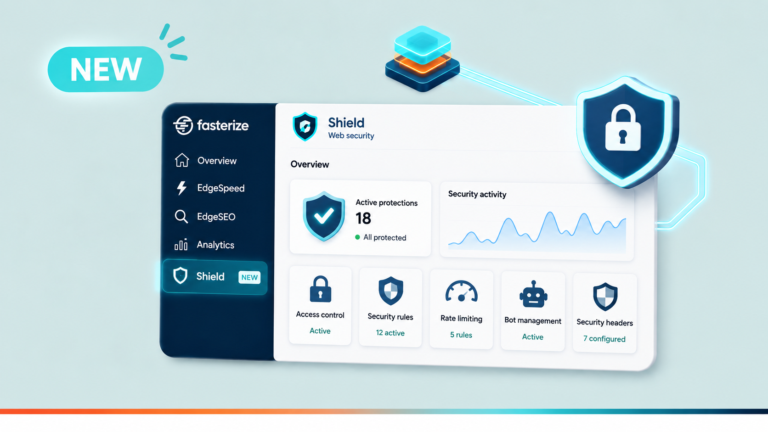
There are no generic “low”, “medium”, or “high” levels. Access control, custom rules, rate limiting, managed protections, bot management, and security headers can each be configured to meet the specific needs of the site. Protections are then applied in a defined order, visible directly from the Shield overview.

Cloudflare’s security technologies, integrated into Fasterize
Shield is built on Cloudflare’s infrastructure and security engines.
Cloudflare provides the underlying technical capabilities. Fasterize integrates them into its platform so they sit within the same management logic as the other dimensions of the digital stack.
The goal is not to replicate the Cloudflare console in its entirety. Shield gives access to the protection mechanisms selected for Fasterize sites, within an interface designed to let teams configure them and monitor their activity.
This approach makes it possible to combine Cloudflare’s security capabilities with Fasterize’s cross-cutting visibility.
Controlling access and adapting security rules
Shield allows you to define who can and cannot access the site through allow or block lists based on IP address, country, or User-Agent.
Teams can also create their own security rules, defining precisely which requests are in scope and what action should apply: block, challenge, observe, or bypass.
Protections can therefore be tailored to the site’s specific characteristics and usage patterns, rather than relying on a one-size-fits-all policy.

Limiting abusive behaviour
Rate limiting allows you to control the frequency of certain requests.
A rule can target a specific scope, define a maximum number of requests over a given period, and apply an action when that threshold is exceeded.
It can be used, for example, to limit repeated attempts on a login page, excessive calls to an API, or automated behaviour on specific user journeys.
Thresholds and actions can be adjusted according to the site’s traffic patterns and characteristics.
Benefiting from managed protections
Not every protection needs to be created and maintained manually.
Shield provides access to several managed mechanisms: always-on HTTP L7 anti-DDoS protection, Browser Integrity Check, and a set of WAF rules covering SQL injection, XSS attacks, and known exploits and vulnerabilities.
The managed WAF can be deployed in observation mode before switching to enforcement. Exceptions can also be defined on specific rules without disabling the entire ruleset.
Teams can therefore roll out rules progressively and observe their behaviour before making further changes.

Managing automated traffic
A search engine, an AI crawler, a legitimate automation tool, and an unwanted bot do not require the same treatment.
Shield allows you to apply different policies according to the categories of automated traffic identified. Verified bots can be distinguished from other forms of automation, while JavaScript-based detection mechanisms complement the identification of these traffic types.
This level of granularity matters particularly within an interconnected digital stack. A decision made about automated traffic can, for example, have consequences for the site’s visibility in search engines.
Strengthening security at the browser level
Shield also allows you to configure different security headers sent to the browser.
HSTS, Content Security Policy, Referrer Policy, X-Frame-Options, Permissions Policy, and cross-origin isolation mechanisms each address different browser-side risks.
Since some of these configurations can have functional implications, Shield provides a recommended baseline and distinguishes between mechanisms that can be enabled with limited risk and those requiring greater care.
From observation to action
Configuring protections is only part of the management picture. Teams also need to understand what is happening across their traffic and track the behaviour of the rules they have put in place.
Shield’s activity view makes it possible to identify changes in threat volumes, analyse their origin or the reputation of clients sending requests, and monitor blocked or rate-limited responses.
This proximity between observation and action means, for example, that teams can spot the emergence of unwanted traffic from a particular geography, adjust an access control rule, and then observe the effects. The same logic applies to an unusual spike in login page attempts or a shift in automated traffic patterns.

Shield applies to security the same logic that underpins Fasterize more broadly: starting from what is actually happening on the site, deciding where to act, and then measuring the effects.
Shield: a new milestone in the Fasterize vision
With Shield, Fasterize adds security to the dimensions of the digital stack that the platform makes it possible to manage.
This launch is part of a broader ambition: breaking down the silos around site management to better account for the interactions between its different components.
Because as technologies, data, and expertise become increasingly specialised, value no longer lies solely in the ability to optimise and manage each area independently. It also lies in the ability to put them in perspective, understand their interactions, and act in a coordinated way.
That is what Fasterize aims to make possible: a simpler, more joined-up, and more effective approach to managing the digital stack.
With Shield, Cloudflare’s security technologies join this approach, making it possible to integrate traffic protections into this broader view of the site.
Fasterize Shield is now available. Already a Fasterize customer? Contact your Customer Success Engineer to discuss implementation on your sites. Want to discover Fasterize and Shield? Get in touch with our team to arrange a demonstration.