









Anthony Barré, CTO at Fasterize, published this article in its original English version in the Perf Calendar 2019. Here is the French translation.
In recent years, an increasing number of web performance optimisation tools and solutions have been offering hosting or proxy services for third-party resources, with the aim of optimising page load speeds in the browser. Akamai,
for example, allows you to configure specific behaviour
for URLs generated as part of such an approach; Cloudflare offers an Edge Worker
for this purpose; and Fasterize can rewrite a page’s URLs
to reference
via the main domain. If your third-party services or scripts do not change frequently, and you need to optimise resource management to improve your pages’ loading speed, a proxy service is an option. It allows you to improve the localisation of these resources and thus better support client-side caching. You also ensure that, in the event of an outage or a drop in performance from the provider of your third-party services, your users will not be affected.
The benefit of self-hosting third-party resources: performance optimisation
If you host third-party services, the impact on performance and your pages’ loading speed is straightforward: the browser performs a DNS resolution, establishes a TCP connection and carries out TLS negotiation on a third-party domain; and the browser benefits from the HTTP/2 multiplexing and prioritisation established on the main domain. You can see the resulting difference between the two waterfall charts below:
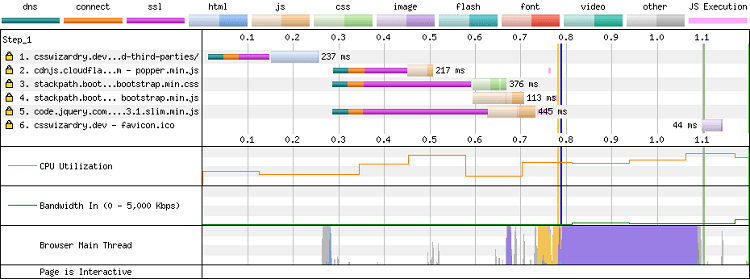
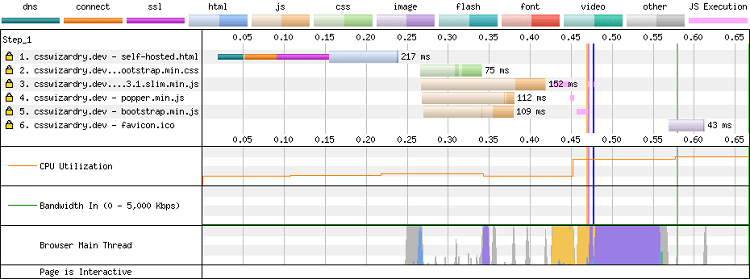
Without self-hosting, given that third-party resources are served from a domain different from the page’s, they cannot be prioritised and end up competing for bandwidth, which can significantly slow down the retrieval of other critical resources, and thus degrade the loading speed and user experience. Patrick Meenan explains this phenomenon very clearly in his talk on
HTTP/2 prioritisation.
We might assume that attempting to preconnect every critical third-party domain could solve the problem, but in practice, preconnecting too many domains can overload the bandwidth, so this would be counterproductive. Therefore, by self-hosting third-party resources, you’ll control how they’re served:
- you ensure that the best compression algorithm is used for each browser (Brotli / Gzip);
- you can extend cache times, which are traditionally short, even for the best-known providers (e.g. a GA tag set to 30 minutes);
- you can even extend the Time To Live (or TTL) to one year by including these assets in your cache management strategy (URL hashing, versioning, etc.). We’ll look at this point later in the article.
No service disruption
Another interesting aspect of self-hosting third-party resources is the mitigation of risks associated with slowdowns and outages. Suppose your A/B testing solution is very slow and implemented as a blocking script in the
`head`
section of your page’s HTML code; the result is that either the page will remain blank, or it will take some time to load. Furthermore, if you use a library from a third-party CDN, you risk breaking your website’s JavaScript logic if the third-party provider is down or blocked in a particular
country. You can check the SPOF section on WebPageTest to see how your website behaves when an external service is interrupted:

What about the browser caching penalty? (spoiler: it’s a myth)
You might think that using a public CDN will automatically result in better performance and faster content loading, as it has a better network and is distributed, but the reality is more complex. Let’s take the example of different websites: Website1.com, Website2.com, Website3.com. We use jQuery on each of them and include it from a CDN such as googleapis.com. The expected behaviour of a browser would be to cache it once and for all and use it for all other websites. This would reduce the websites’ hosting costs and improve performance. But in practice, this is not what happens. This is particularly evident with Safari,
which implements a feature called Intelligent Tracking Protection – the cache is double-locked based on the document’s origin and the third-party origin. This is explained very clearly in this article, ‘Safari, Caching and Third-Party Resources’,
by Andy Davies. Chrome will also partition its cache. Furthermore, research by Yahoo, Facebook and, more recently, Paul Calvano, has shown that resources do not remain in the browser’s cache for as long as one might expect: “There is a significant discrepancy between the age of first-party resources and that of third-party scripts for CSS and web fonts. 95 per cent of first-party fonts are over a week old, compared with 50 per cent of
third-party fonts, which are less than a week old! This makes a strong case for self-hosted web fonts!” For these reasons, you won’t notice any drop in performance due to browser caching! Now that we’ve seen the benefits of self-hosting third-party resources, let’s look at what distinguishes a good implementation from a bad one.
The risks: the devil is in the details
Bringing third-party resources onto the main domain cannot be done automatically without taking caching into account. So, pay close attention to the lifecycle of resources! The good news is that versioned third-party scripts,
such as jquery-3.4.1.js, won’t cause any caching issues, as no changes will be made to this file in future. However, if
versioning
isn’t in place, scripts can become obsolete. This can become a major problem as you’ll miss out on important security patches if you don’t carry out manual updates, and you may even introduce bugs if there’s a mismatch between a tag and its backend. Nevertheless, whilst caching a resource on a regularly updated CDN (tag
managers, A/B testing solutions) is more difficult, it is still possible. Services such as Commander Act, a
tag
management solution, require a webhook to be triggered when a new version is released. This allows the CDN to be flushed, or better still, triggers an update to the URL’s
hash or version.
Adaptive Serving
When discussing caching, we must bear in mind that the cache options or settings on the CDN may not be suitable for third-party resources. Third-party services may implement User-Agent sniffing (also known as Adaptive Serving) to serve versions optimised for a specific browser. They rely on a regular expression or a database of the User-Agent
HTTP header to determine browser capabilities and offer the appropriate version. Two examples spring to mind to illustrate this principle: googlefonts.com and polyfill.io. Google Fonts serves at least five different CSS file versions for a single resource, depending on the
User-Agent’s
capabilities (WOFF2 support, Unicode range, etc.). Google font requested by the Chrome browser:
 Google font requested by the IE10 browser:

Polyfill.io, on the other hand, returns only the polyfills required by the browser for performance reasons. Consequently, the size of the request to https://polyfill.io/v3/polyfill.js?features=default is 34 KB when loaded by Internet Explorer 10, and empty when loaded by the Chrome browser.
Behind the scenes: a few words on privacy issues
Bear in mind, however, that supporting third-party scripts via the main domain or subdomain is not without implications for user privacy and for your business. If your CDN is poorly configured, you risk sending cookies from your own domain to a third-party service. Your session cookie, which is normally inaccessible via JavaScript (due to the `httponly`
attribute), will then be sent to a third-party host if there is no filtering at the CDN level. This is exactly what may have happened with trackers such as Eulerian, Criteo… Third-party
trackers
were able to set a unique identifier in cookies, which they could then freely read across the various websites visited, provided that the third-party
tracker
was included on the site. Nowadays, most browsers include safeguards against this practice. Consequently, they require these third parties to disguise themselves as first-party
trackers
behind a random subdomain, with a CNAME pointing to a generic, unbranded domain. This method is known as CNAME cloaking. Although it is considered poor practice for a website to set cookies accessible to all subdomains (i.e. *.website.com), many sites do so. In this case, these cookies are automatically sent to the hidden third-party
tracker
– game over.
The same phenomenon occurs with HTTP Client-Hints
headers, which are only sent to the main domain, as they can be used to create a ‘fingerprint’ that allows the user to be tracked. Ensure that your CDN also filters these headers correctly.
Conclusion
If you want to self-host third-party resources, here are a few tips to optimise your page load speed and provide the best experience for your users:
- self-host your critical JavaScript libraries, fonts and CSS. This will reduce the risk of a single point of failure (SPOF) or performance degradation along the critical path.
- Before caching a third-party resource on a CDN, ensure it is versioned or that you can manage its lifecycle by manually or even automatically flushing the CDN when a new version is released.
- Check your CDN/proxy/cache configuration to avoid sending cookies from your domain and Client Hints to third-party services.
If you’d like to keep up to date with the latest news on web performance and evolving best practices,
subscribe to our monthly newsletter: