









Web performance is essential to delivering an optimal user experience. Any slowdown whether in page rendering or interactivity creates friction in the customer journey and can lead to users abandoning navigation or the purchase process.
Among key performance indicators, INP (Interaction to Next Paint) has gained importance, particularly with the evolution of Google’s Core Web Vitals requirements.
With the new SmartINP feature, Fasterize enables websites to optimize their INP, especially in environments where third-party scripts heavily impact page responsiveness.
What is INP and why does it matter?
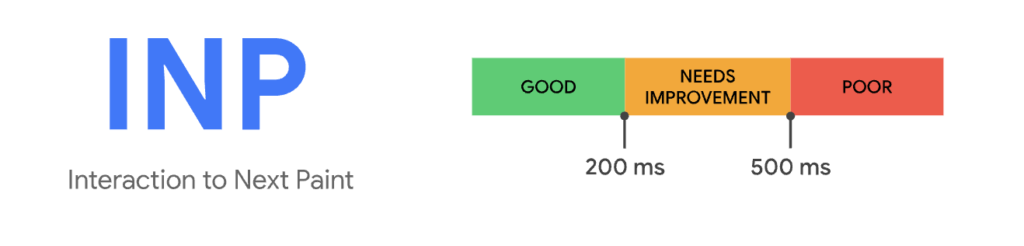
INP measures the time between a user interaction (click, input, etc.) and the next visual update on the screen. A fast INP ensures a smooth and responsive experience, which is critical to how users perceive a website’s speed.
Google recommends an INP below 200 ms to ensure a high-quality user experience. However, in practice, it is one of the most difficult metrics to optimize.
Why?
Because it doesn’t depend solely on your own code, but on everything running at the moment of interaction especially third-party scripts.
This is precisely where many websites struggle to improve.
The impact of third-party scripts on INP
Third-party scripts (tracking, advertising, A/B testing, widgets, etc.) have become essential for many websites.
However, they introduce a structural issue: they compete with your own scripts at the exact moment of user interaction.
When a user clicks or interacts:
- multiple scripts may trigger simultaneously
- the browser must prioritize their execution
- visual rendering is delayed
As a result, even a technically optimized website can suffer from degraded INP.
More importantly, these scripts are often outside the direct control of technical teams.
SmartINP: a new approach to INP optimization
Our new SmartINP feature is based on a simple principle: intelligently prioritizing script execution at critical moments.
In practice:
- user interactions are detected in real time
- scripts required for immediate rendering are prioritized
- secondary third-party scripts are delayed or reordered
- execution is optimized without breaking existing functionality
All of this happens at the Edge, with no changes to your source code or application stack.
The result: improved perceived responsiveness, with no functional trade-offs.
Deployment is very simple via the EdgeSpeed console. Activation automatically handles most well-known third-party scripts that significantly impact INP, and you can also add or remove your own scripts as needed.
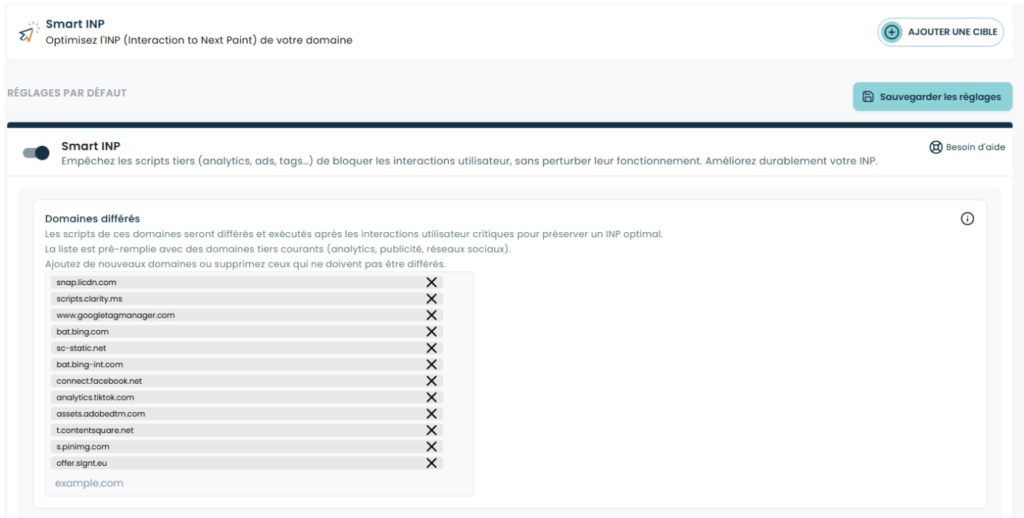
Measured results after enabling SmartINP
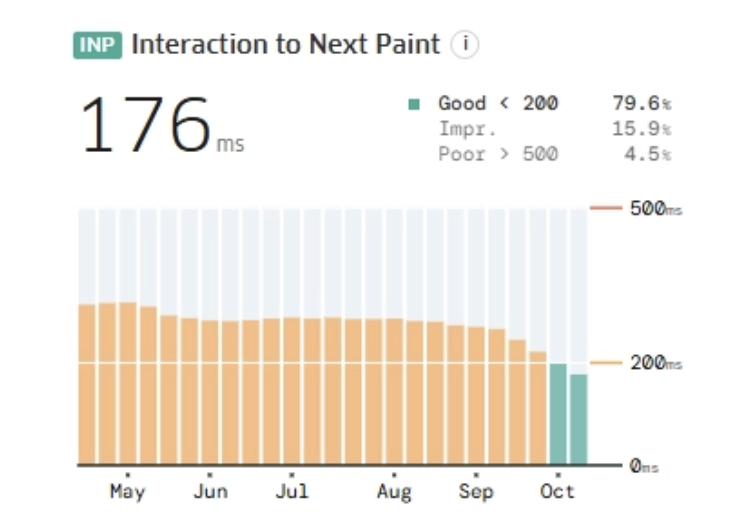
- INP improvement: Activating SmartINP has led to INP reductions of 15% to 50%, particularly on mobile devices, which are often the most affected by third-party scripts.
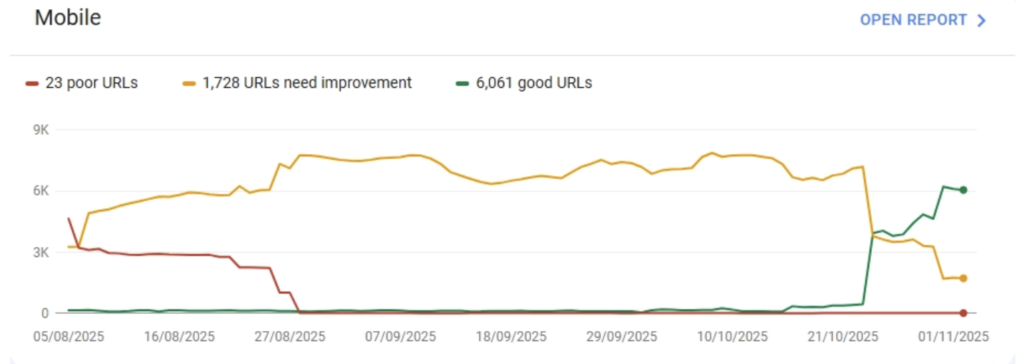
- More fast URLs in CrUX: Thanks to better prioritization of external scripts, up to 85% improvement in the number of URLs classified as “fast” in Search Console has been observed.
Why adopt SmartINP?
- Increased responsiveness: By optimizing INP, SmartINP enables truly instant interactions, even in environments heavily loaded with external scripts.
- SEO impact: Improving INP directly enhances Core Web Vitals scores, which can positively affect rankings in Google search results.
- Better user experience: A low INP ensures a smooth and engaging experience, leading to higher user retention and satisfaction.
Why SmartINP is especially relevant for e-commerce environments
E-commerce websites typically combine:
- strong business pressure on conversion
- a growing number of marketing and analytics tools
- heavy reliance on third-party scripts
These are exactly the conditions where INP becomes difficult to control.
SmartINP helps by:
- enabling quick improvements without requiring a full redesign
- reducing trade-offs between marketing and performance
- securing the user experience at critical points in the journey
Conclusion
INP has become a key metric but also one of the most complex to optimize in modern environments.
With SmartINP, Fasterize offers a targeted solution: acting directly at the moment of interaction to restore real responsiveness, even in the presence of numerous third-party scripts.
A pragmatic approach to regaining control over a critical performance lever.