









An increasingly volatile browser cache

Sommaire
Caching is one of the basic rules of webperf. Caching saves bandwidth and reduces loading times when the same resource is called up a second time. At least, that’s the original plan… but it turns out that’s not always the case.
In fact, not all resources that are supposed to be served by the cache actually are. To better understand the problem, let’s take a look at the average lifetime of a resource in a cache. You’d think that a browser would cache data once and for all, but in practice this isn’t the case. Safari, for example, implements a feature called Intelligent Tracking Protection – the cache is double-keyed based on document origin and third-party origin; Chrome also partitions its cache. Thus, according to a Facebook study, only 42% of cached resources are more than 47 hours old, and only 25% are more than 260 hours old. This research by Yahoo, Facebook and, more recently, Paul Calvano, indicates that resources don’t live as long in the browser cache as we might think. And when we conduct the same experiment on mobile, we find that there’s a 50% chance that our cached resource is less than 12 hours old! In conclusion, resources don’t stay hidden for very long.

Why is cache so volatile?

Every browser has its own cache memory.
  • Internet Explorer: 8-50 MB
  • Firefox: 50 MB
  • Safari: no limit (?!)
  • Chrome: less than 80 MB (depending on available disk space)
  • Opera: 20 MB
When this limit is reached, the cache automatically deletes the oldest files to make room for new resources. As web pages get heavier and heavier, the lifespan of resources in a cache becomes shorter and shorter. For example, in October 2000, the average size of a web page was 89 kb (including images and scripts). Today, the average size is 2.6 MB, a 30-fold increase in 15 years!

What can be done about cache volatility?

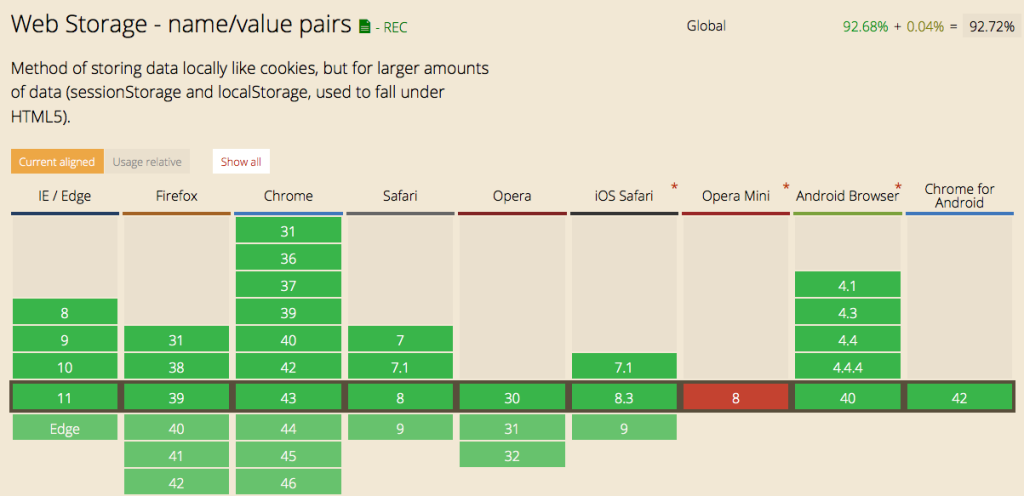
To ensure that a website’s resources remain hidden, you can use LocalStorage. This allows data to be stored directly in the browser. Its storage capacity (5 MB for most browsers) is dedicated to a domain name. To date, 92.72% of browsers have deployed it:
navigateur localstorage

Unlike cache, local storage has no expiration date. Once the limit has been reached, no resource is automatically deleted. It’s no longer the browser that manages storage and eviction, it’s the site itself that determines which resources are to be removed from this storage space. The volatility we’ve just described underlines the importance of optimizing your site so as to reduce the weight of resources as much as possible, and thus lighten the cache. With this in mind, he explains a number of best practices for improving first-visit loading times: image compression, minification and concatenation of JS and CSS, and the use of a CDN (global or local).

Would you like to facilitate the application of these best practices and automate the optimization of your web performance?


Sommaire
Test your site's performance in 1 click

Published by

Share!

Discover other articles…

Interface Fasterize présentant SEO Metadata avec le score de santé SEO et SEO Monitoring avec les données Google Search Console et le suivi des optimisations.

Fasterize is expanding its platform with two new SEO applications. SEO Metadata detects and prioritizes technical issues across your website, while SEO Monitoring connects your

…
cdn banniere

Track your CDN’s performance with Fasterize: traffic, cache, errors, bandwidth and response times all in a single dashboard, so you can better understand fluctuations on

…
Interface Fasterize Shield présentant le pilotage des protections web, des règles de sécurité, du rate limiting et des bots.

With Fasterize Shield, security becomes part of the broader management of your digital stack. Powered by Cloudflare technologies, this new application lets you configure, monitor,

…

Boost your site speed now with EdgeSpeed!